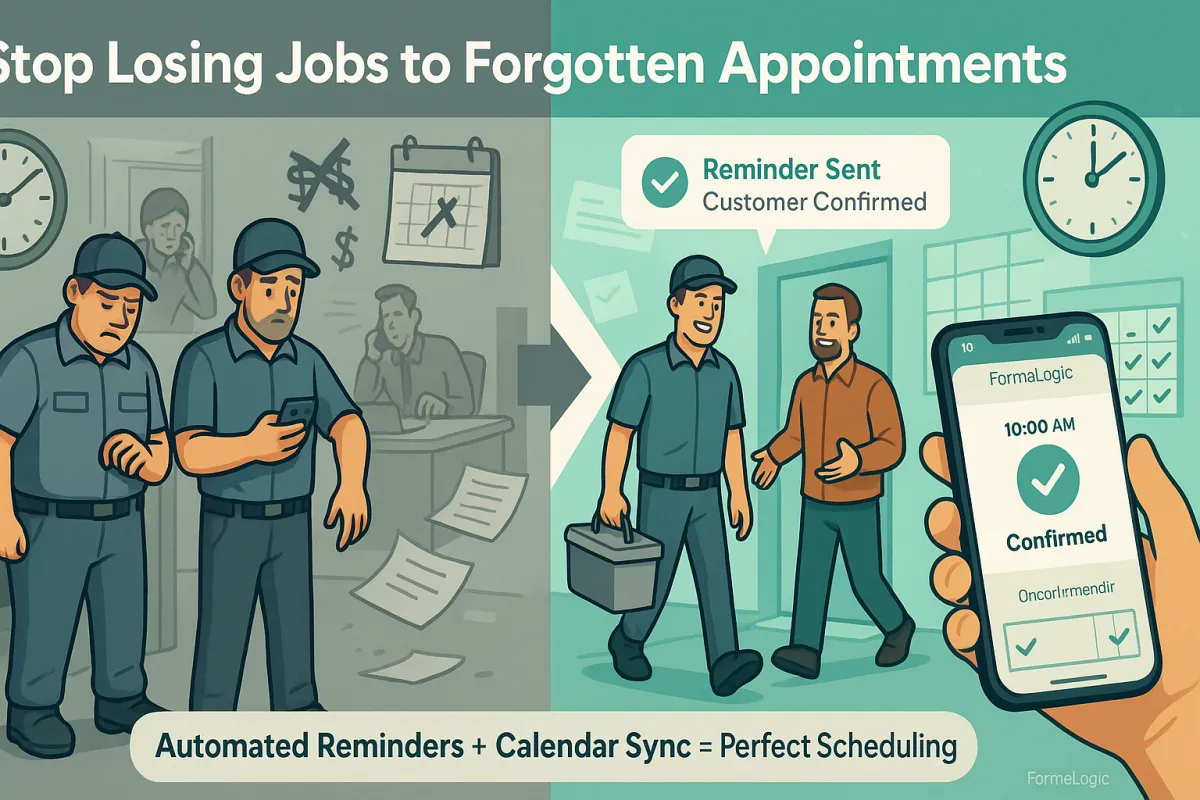
How to Never Miss an Epoxy Flooring Appointment Again
Reduce No-Shows by 65%
There's a phone call every contractor dreads. A customer calls an hour before their scheduled appointment and says, "I completely forgot you were coming today. Can we reschedule?"
In that moment, you feel a mix of emotions. Frustration because your schedule is now disrupted. Disappointment because you blocked off time and prepared materials. Worry because you're thinking about the money you're losing.
But here's what the customer is feeling too. They're embarrassed. They feel bad. They didn't mean to forget. Life just got busy and the appointment slipped their mind.
This happens in every home service business. Appointments get forgotten. Customers cancel at the last minute. Time gets wasted. Money gets lost.
The epoxy flooring business is especially vulnerable to this problem. When a customer books an estimate, it might be weeks away. By the time the appointment arrives, they might have forgotten all about it. Or their schedule changed. Or they got a quote from someone else and forgot to tell you they're going in a different direction.
For every no-show or last-minute cancellation, you lose money. You lose time. You lose the opportunity to make a sale.
But here's the good news. This problem has a solution. And it's simpler than you might think.
The Real Cost of No-Shows and Cancellations
Let's talk about what a no-show actually costs you.
Say you have a one-hour appointment scheduled to give an estimate on an epoxy flooring project. You drive to the location. It's a 20-minute drive each way. You spend 30 minutes measuring and taking photos. You spend 30 minutes talking to the customer.
The appointment is blocked off on your calendar for 2 hours. But when you add in travel time and preparation, you're really spending 2.5 to 3 hours total.
Now imagine the customer isn't home when you arrive. They forgot. You wait 10 minutes in case they're just running late. Then you realize they're not coming.
You've just lost 3 hours of your time. You can't get that time back. You can't use those 3 hours to do another estimate or install a floor. That time is gone.
And that's just the direct cost. There are indirect costs too. You have materials in your truck. You blocked off your schedule. You might have turned down another customer for that time slot because you thought you were booked. Now you have a gap in your schedule and you can't fill it.
Most contractors estimate that a no-show costs them $100 to $300 in lost time and opportunity. Some no-shows cost even more.
Now imagine if you have two no-shows per month. That's $200 to $600 in lost revenue every single month. That's $2,400 to $7,200 per year.
But that's only the cost of no-shows. There are also last-minute cancellations. A customer calls 2 hours before their appointment and says they need to reschedule. You weren't able to fill that time with another customer because the notice was too short. So you lose another $150 in potential revenue.
If you have two last-minute cancellations per month on top of the no-shows, you're losing $400 to $900 per month. That's $4,800 to $10,800 per year.
Add it all together. If you're losing 2 no-shows and 2 last-minute cancellations per month, you're losing somewhere between $7,200 and $18,600 per year.
That's real money. That's money you could be investing in your business, paying your team, or taking home as profit.
Why Customers Forget
Before we talk about the solution, let's understand why this happens in the first place.
When a customer books an appointment for an epoxy flooring estimate, they're often planning ahead. Maybe the appointment is three weeks away. They're thinking about their floor. They're excited about the project. They write down the date and time, or they save it in their phone.
But then life happens. Days pass. The appointment becomes less urgent in their mind. They get busy with work and family. They check their calendar at the beginning of each week, but they don't look at appointments three weeks out.
The week of the appointment arrives. They're still thinking about the project, but now they're also dealing with a million other things. They might remember the appointment on Tuesday, but forget about it by Thursday. By the time Monday comes around (the day of the appointment), it slips their mind completely.
Or maybe something changed. They got another quote. They decided to wait until next year. They got a promotion and their schedule is crazy. They forgot they ever called you.
From the customer's perspective, this is not malicious. They didn't forget on purpose. They're busy. They have a lot going on. An appointment three weeks in the future isn't top of mind.
But from your perspective, you've blocked off your time. You're ready. You're waiting. And they don't show up.
The solution is not to expect customers to remember. The solution is to remind them.

Automated Reminders Change Everything
This is where FormaLogic's automated reminder system becomes powerful.
When a customer books an appointment, FormaLogic can automatically send them reminders at the times you choose.
Most contractors set up two reminder touches. The first reminder goes out 24 hours before the appointment. It's a friendly message that says something like, "We're excited to help with your epoxy flooring project! Just confirming our appointment tomorrow at 2 PM. Looking forward to seeing you then."
This first reminder is far enough in advance that if the customer needs to reschedule, they have time to call or text you back. You get the message early. You can adjust your schedule and potentially book another customer into that time slot.
The second reminder goes out 2 hours before the appointment. It's a simple message: "We're heading to your location now for your epoxy flooring estimate appointment. We'll be there in about 30 minutes. See you soon!"
This second reminder is close enough to the appointment that it's fresh in the customer's mind. They can't have forgotten if they just got a message 2 hours ago. If they somehow can't make it, they have two hours to call you instead of zero hours notice.
These automated reminders work. Study after study shows that appointment reminders reduce no-shows by 20% to 65%, depending on how the reminders are set up. When you use two-touch reminders (one day before and two hours before), you see the biggest reduction in no-shows.
FormaLogic sends these reminders automatically. You don't have to think about them. You don't have to remember to send them. The system handles it.
Eliminating Double-Bookings and Scheduling Conflicts
No-shows aren't the only scheduling problem contractors face. Double-bookings are another common issue.
Imagine this scenario. You're managing your schedule on your phone. You also have a team member managing schedules on a shared calendar. A customer calls and asks about availability. You check your phone, see that Wednesday at 2 PM is open, and book them in. But your team member also checked the shared calendar and booked a different customer for the same time.
Now you have two customers scheduled for the same appointment slot. One of them is going to be disappointed.
Or maybe you're double-booked yourself. You have an installation scheduled from 1 PM to 4 PM. But you also have an estimate scheduled for 3:30 PM. You can't be in two places at once. One customer is going to have to be rescheduled.
These conflicts happen because different tools don't talk to each other. Your phone calendar has one version of your schedule. Your team member's calendar has another version. The customer's email confirmation has a third version. Nobody has a single source of truth about what's actually booked.
FormaLogic solves this by giving you one unified calendar. When you book an appointment, it shows up in the system immediately. Everyone on your team sees the same calendar. When your team member checks availability, they see exactly what's actually booked. There's no confusion. There's no double-booking.
If you use Google Calendar or another calendar app, FormaLogic syncs with it. When you book something in FormaLogic, it automatically updates Google Calendar. When you add something to Google Calendar, it shows up in FormaLogic. Everything stays in sync.
Real-Time Visibility for Your Job Site Team
Here's something that most contractors don't think about. When you're out on a job site installing epoxy flooring, you might not know your schedule for the rest of the week.
Maybe you're working on a big installation that's taking longer than expected. You're wondering if you have time to do another estimate this week. Or you're wondering when your next appointment is. You could call your office manager, but they're busy. You have to wait for them to call you back.
With FormaLogic, you don't have to wait. You can pull out your phone and see your entire schedule. You can see which appointments you have today, which ones you have this week, which ones are confirmed, and which ones are pending.
If a customer calls while you're on a job and wants to book an estimate, you can check your availability right there and book them in. You don't have to wait until you get back to the office.
If you're delayed on a current job and you're going to be late for your next appointment, you can see that appointment on your phone and send the customer a message letting them know you're running late. The customer appreciates the heads-up. They don't have to sit around wondering where you are.
This kind of real-time visibility makes your business run smoother. Your team can respond faster. Your customers get better service. No-shows decrease because customers remember you're coming, and you're more likely to show up on time.
Integrating Everything Into One System
One of the biggest advantages of FormaLogic is that everything connects together.
Here's how it works. A customer calls about an epoxy flooring estimate. Your team member talks to them, gets their information, and books an appointment. That information goes into the system.
FormaLogic automatically sends the customer a confirmation of the appointment. It might be a text message or an email, depending on your setup.
Then FormaLogic automatically schedules the reminders. Twenty-four hours before the appointment, the customer gets a reminder. Two hours before, they get another reminder.
When the appointment arrives, you go to the customer's location and give the estimate. After the estimate, you enter the price and scope of work into FormaLogic.
Now that information is in the system. If the customer accepts the estimate, FormaLogic can automatically schedule the installation. It blocks off the dates on your calendar. It sends the customer a confirmation of the installation date.
When the installation is complete, FormaLogic can automatically send an invoice. It can ask for a payment. It can request a review.
Everything flows together. Nothing gets lost. Nothing falls through the cracks. One system handles the entire customer journey from initial inquiry all the way through to completed job and review.
This integration means less data entry. Your team doesn't have to manually type customer information into five different systems. Everything is in one place.
Strategic Timing of Reminders
Not all reminder timing is created equal. When you send reminders matters.
If you send a reminder too far in advance, the customer might forget about it by the time the appointment arrives. A reminder three days before an appointment might be forgotten within 24 hours.
If you send a reminder too close to the appointment, the customer might have already made other plans or gone somewhere else. A reminder one hour before an appointment doesn't give the customer enough time to call you if they need to reschedule.
The sweet spot is 24 hours before and 2 hours before.
The 24-hour reminder gives customers enough advance notice to reschedule if they need to. It jogs their memory without being too far in advance. If they're going to cancel, they'll probably call you within a couple hours of getting that reminder. That gives you time to rebook the slot with another customer.
The 2-hour reminder is perfect for confirmations. It's close enough that they can't have forgotten, but far enough away that they can still let you know if something unexpected came up.
For estimates scheduled during peak season, you might also add a reminder for the morning of the appointment. This gives you three touches: three days before, 24 hours before, and 2 hours before. That's probably overkill for most situations, but if you're managing a high volume of estimates, the extra reminder could be worth it.
The point is, FormaLogic lets you customize when reminders go out. You can set them up to match your business and your customers' needs.
Managing Peak Season Efficiently
Epoxy flooring has seasonality. Spring and summer are busy. Fall and winter are slower. During the busy months, you might be booking estimates weeks out.
Managing lots of future appointments can be complicated. You have dozens of estimates scheduled. Each one needs to be tracked. Each one has a different address. Each one is at a different time.
Without a good system, you can lose track. You might forget to follow up on a quote from three weeks ago. You might accidentally schedule two estimates at the same location on the same day. You might not have enough installers scheduled for the jobs you've sold.
FormaLogic helps you manage this complexity. You can see all your estimates on one calendar. You can see which ones have been quoted and which ones are still pending. You can see which ones are converting to jobs and which ones are falling through.
You can also see your installation schedule alongside your estimate schedule. So you know how many open installer slots you have coming up. If you have 20 estimates in the pipeline but only 4 of them are scheduled to convert to jobs, you know you might have some slow weeks ahead. You can adjust your sales efforts accordingly.
When peak season is really busy and you have 100 estimates to manage, FormaLogic gives you visibility and organization. Things don't fall through the cracks. Every estimate gets the follow-ups it needs. Every appointment reminder gets sent on time.
Reducing Friction in the Scheduling Process
The easier you make it for customers to book appointments, the more appointments you'll have.
Some contractors still use a phone-based booking system. A customer calls. Your office manager checks the calendar and finds an open time. The customer says yes. The appointment is booked.
But this system has problems. Your office manager might not be available when the customer calls. The customer has to wait for a callback. By the time they hear back, they might have called three other contractors too. Or they might have just given up.
FormaLogic enables 24/7 online booking. A customer can go to your website, see your available appointment times, and book one themselves. They don't have to call. They don't have to wait. They book at midnight on a Sunday if they want.
When they book online, their information is captured automatically. They get a confirmation immediately. The appointment is on your calendar. Reminders are scheduled.
This 24/7 availability is increasingly expected by customers. If you don't offer it, your competitors probably do. You'll lose bookings to businesses that make scheduling easier.

The Domino Effect of Fewer No-Shows
Let's think about what happens when you reduce no-shows by 50%.
If you currently have 2 no-shows per month, reducing that by 50% means you now have 1 no-show per month. That's one extra estimate per month that actually happens.
If your close rate is 30%, that one extra estimate per month converts to one extra job every three months. If your average job is worth $3,500, that's $3,500 in additional revenue every three months. That's $14,000 per year from fewer no-shows.
But the benefits extend further. When you don't have no-shows, your schedule doesn't have gaps. Those gaps were probably causing you to be inefficient. You might have been doing smaller jobs to fill the time, or just taking slower days.
With fewer gaps, you can be more efficient. You can group jobs by location, reducing drive time. You can schedule installers more effectively. Your productivity per person goes up.
Better productivity means more jobs completed. More jobs completed means more revenue.
The Simplicity of Implementation
You might think that setting up automated reminders requires technical expertise. It doesn't.
In FormaLogic, you set up reminders once. You decide which reminders you want (24 hours before, 2 hours before, etc.). You write the message. You choose whether to send it via text or email.
Then it's done. From that point forward, every appointment automatically triggers those reminders at the right times. You don't have to do anything manually.
If you want to change the reminder timing or the message, you can. But most contractors set it up once and never touch it again.
The setup takes maybe 15 minutes. The benefit lasts forever.
The Psychology of Reminders
There's something important to understand about reminders. They work not just because they jog the customer's memory. They also communicate something important.
When a customer gets a reminder from you, it sends a signal. It says, "We care about this appointment. We're organized. We're professional. We're taking this seriously."
A contractor who sends reminders seems more professional than one who doesn't. That affects how the customer perceives your business. It affects their confidence in you. It affects their willingness to trust you with their floor.
Customers appreciate reminders too. Even though it's your job to show up, they like knowing they won't be forgotten. A reminder is a small gesture that makes them feel valued.
Starting Today
If no-shows and cancellations are costing you money, the solution is right in front of you.
Automated appointment reminders are one of the easiest and fastest ways to improve your bottom line. The cost is minimal. The setup is simple. The payoff is immediate.
You can reduce no-shows by 50% or more. You can eliminate double-bookings. You can give your team real-time visibility into schedules. You can manage peak season more efficiently.
All it takes is setting up one system. FormaLogic handles the rest.
The contractors who do this see a difference within weeks. No-shows drop. Confirmed appointments increase. Revenue goes up. Stress goes down.
The contractors who don't do this continue losing money to the same problems year after year.
The choice is yours. But the data is clear. Automated reminders work. The only question is when you'll implement them.
